

Shopify & Ecommerce
Your Digital Foundation: Choosing the Right Platform with a Web Design Company in Amman Jordan
Shopify or WordPress: what each platform does best, and how to choose the right foundation for your website in Jordan.
7 min read
Who we help
Your industry, your market
By industry13 industries
Luxury & retail5
Ecommerce & tech3
Food & hospitality1
Services & lead generation4
Not listed? Most of what we run carries across. Ask on WhatsApp (opens in a new tab)
All industriesAll marketsProof
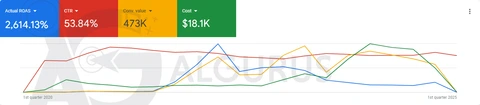
Real numbers, real screenshots
Every number comes from a published AlGurus case, with a platform screenshot.
All 29 case studiesCompany
The team behind the results
Since 2018 · Um Uthaina, Amman
About AlGurus
A results-driven digital marketing agency in Amman, helping businesses in Jordan, the Gulf and beyond grow online since 2018. One certified team for ads, websites, SEO and GEO.
Google Premier, Meta, Shopify, Salla
Certified partners
 Google Premier Partner2026 · top 3% worldwide
 MetaBusiness Partner
 Shopify Partnersince March 2020
 SallaPartner
SEO & GEO checkup, ad analyzer
Audits reviewed by our team
Send your website or your ads dashboard. Our team reviews each request and emails you a branded PDF audit.
Since 2018 · Um Uthaina, Amman
Talk to us
MenuBy industry
By market





 Google Premier Partner2026 · top 3% worldwideMetaBusiness PartnerShopify Partnersince March 2020SallaPartner
 AlGurus Academy (opens in a new tab)ToolsSEO & GEO checkup, ad analyzer
Contact
Services open from the bottom bar
Services · Goal finder
What do you want to grow?
Your growth path4 services, in the order we’d start
Your growth path4 services, in the order we’d start
Your growth path4 services, in the order we’d start
Your growth path4 services, in the order we’d start
Your growth path4 services, in the order we’d start
Your growth path4 services, in the order we’d start
Your growth path4 services, in the order we’d start
Real result
Top 3%
of Google Partners worldwide — we’re a Google Premier Partner
See the case studiesBook a strategy callYour growth pathTwo ways to learn
Real result
13+
years running real campaigns — now taught at Algurus Academy
Visit Algurus AcademyBook a strategy callPaid AdsTurn ad spend into measurable revenue.10 services
Most requested
Open Paid AdsOrganic TrafficRank on Google, Maps, app stores and AI answers.4 services
Most requested
Open Organic TrafficWeb DevelopmentFast stores and sites built to convert.6 services
Most requested
Real result
326K JOD
in Shopify sales for a hardware store
75+ Shopify stores built
See the case studiesSocial Media ManagementContent and community that keep you top of feed.3 services
Most requested
Open Social Media ManagementGraphic DesignA brand people recognise in one scroll.4 services
Most requested
Open Graphic DesignConsultationSenior eyes on your ads, store and growth plan.5 services
Most requested
Open ConsultationTrainingLearn it from the team that runs it — via Algurus Academy.Algurus Academy
Courses at Algurus Academy
 Google PartnerPremier 2026MetaBusiness PartnerShopifyPartnerSallaPartnerOur partnerships
Markets:KSAUAEIraqQatarKuwaitUSACanadamore soon
WhatsAppNot To‑do, Doing, Done. Your stages, your deadlines.
Custom task management tools built around how your team actually works: your own stages and job types, deadlines per task, automatic assignment, WhatsApp updates and a client view that ends the "any news?" calls.
Brief2
In design2
Client review2
Approved1
New2
Assigned1
On site2
Done1
Requested2
Scheduled2
In visit1
Follow-up2
AlGurus builds custom task management tools in Amman, Jordan for teams whose work does not fit generic apps. Each tool uses your own stages and job types, deadlines and SLAs per task, automatic assignment by skill, area or workload, notifications by WhatsApp or email, and an optional client view where customers follow progress. Managers get on-time and workload reports, and you own the code and data.
Tools like Trello, Asana, ClickUp and Monday are excellent general-purpose products, and for many teams they are the right choice. But they are designed for every kind of work at once. A maintenance company, a design studio and a clinic all manage tasks, yet their stages, deadlines, approvals and customer communication are completely different. When the tool does not know how your work really flows, people fill the gaps with spreadsheets, side chats and phone calls, and the board stops reflecting reality.
A custom task management tool is built around your exact workflow. Your job types have their own fields and checklists, your stages have rules about who can move a task forward, deadlines are calculated from your service promises, and customers can see progress without calling. The board becomes the single place where the work is actually managed.
Stages named the way your team talks, with different fields, checklists and attachments per job type.
Response and completion targets per job type and client, with working hours and holidays taken into account.
New tasks routed by skill, area, client or current workload, so nothing waits for someone to hand it out.
The right people notified at the right moment, including customers, using message templates you control.
A simple branded page or portal where customers follow their job, approve work and download files.
Who is overloaded, which job types run late and where tasks wait the longest, without chasing anyone.
The first thing we design is the workflow: the stages a task passes through, who owns each stage, and what must be true before it can move on. These are simplified versions of workflows we commonly design. Yours will follow your own process.
Creative work is all about briefs, revisions and client approval. The tool tracks revision rounds, keeps every version and comment in one place, and stops a task being marked done until the client has approved it.
Field service work depends on location, urgency and proof that the job was done. The tool assigns jobs by area and skill, tracks response time against the SLA and collects photos and signatures on site.
Clinic tasks revolve around appointments and follow-up care. The tool makes sure every request is called back in time, every visit has the right preparation and no patient is forgotten after treatment.
A due date on a card is easy to ignore. A service-level agreement in a custom tool is active: each job type has a target time, the clock respects your working hours and public holidays, and the right people are told automatically as the deadline approaches, rather than finding out after the customer complains.
Different people need to look at the same tasks differently. Team members want a board of their own work. Coordinators want a list they can sort and filter. Managers want a calendar of deadlines and a view of who is overloaded. In a custom tool all four views read from the same tasks, so updating one updates them all.
| Task | Owner | Type | Due | Status |
|---|---|---|---|---|
| Kitchen leak, Dabouq | Rami | Urgent leak | Today 13:12 | On the way |
| Water heater, Abdoun | Sami | Install | Today 17:00 | Assigned |
| Annual AC check, Khalda | Yazan | Service | Tomorrow | New |
| Pump check, Sweifieh | Yazan | Plumbing | Tomorrow | On site |
| Socket repair, Villa 12 | Rami | Electrical | Today 15:00 | At risk |
Rami is over capacity this week. New jobs in his area route to Mahmoud automatically.
A large share of calls to service businesses are customers asking for an update. A client view answers that question automatically. Each customer gets a secure link or portal, in Arabic or English, showing where their job stands, who is assigned, what happens next and any files or approvals waiting for them.
Key moments, such as a technician on the way or a design ready for review, can also be sent as WhatsApp or email messages from templates you approve. Your team stops spending time on status calls, and customers feel looked after rather than chasing.
Client views show only what you choose to share. Internal notes, costs and staff comments stay internal.
Most coordination work follows simple rules: when this happens, do that. Once those rules are written into the tool, nobody has to remember them. These are automations we build most often.
Assign it automatically by area, skill, client or the person with the lightest workload, and start the right SLA clock.
Tell the customer on WhatsApp or email using an approved template, in their language.
Check the checklist, require photos or a signature where needed, then trigger the invoice or the next task.
Create recurring tasks such as monthly maintenance, weekly content or annual renewals, with owners and deadlines set.
Turn website forms, emails and WhatsApp messages into tasks with the details already filled in.
Send the week's report to managers: open tasks, late tasks, on-time rate and workload per person.
If one of these products fits your workflow with small compromises, use it. They are mature, affordable to start and constantly improving. A custom tool is worth it when your workflow, your customer communication or your licence costs have outgrown them.
| Question | Generic task apps | Custom task management tool |
|---|---|---|
| Workflow | Configurable boards and fields within the product's model | Your stages, rules and job types exactly |
| SLAs | Due dates; advanced SLAs often need add-ons | Working-hours SLAs per job type and client, with escalation |
| Customer updates | Guest access or external integrations | Branded client view and WhatsApp updates built in |
| Arabic and RTL | Partial in most products | Full, for staff and customers |
| Connections | The vendor's integrations | Your CRM, store, accounting and WhatsApp directly |
| Cost model | Per user, per month | Build once, then hosting and care, not per seat |
A task tool is only useful if the team works in it and it helps them deliver on time. We agree these measures with you before launch and report on them afterwards.
Share of tasks completed within their SLA, by job type, person and client.
Where tasks wait longest, so bottlenecks are visible and fixable.
Open tasks per person against capacity, week by week.
How often customers still call for updates once the client view is live.
AlGurus has run campaigns, content calendars, store launches and client projects for more than 120 brands since 2018. Managing many teams, many clients and many deadlines at once is our own daily reality, and it shapes the task tools we build for others.
Task management tools are internal software, and most clients prefer not to publish their operations. We do not quote figures we cannot show publicly.
Examples, screen recordings and references are shared on your strategy call, under NDA where a client asks for it.
The quickest way to get a task tool wrong is to design it in a meeting room. We design it with the people who will use it every day, and put a working version in their hands early.
We follow real jobs from request to completion and collect the sheets, chats and tools used today.
Workflow notesStages, job types, SLAs, roles and automations agreed and written down.
Workflow specBoard, task screens and client view as a clickable prototype in Arabic and English.
Figma prototypeTwo-week sprints, with one team testing on real work from the first usable version.
Pilot teamOpen tasks imported, everyone trained on their own screens, old tools retired.
Training · importMonthly review of on-time and workload reports, with improvements to rules and screens.
Care planAt the end of the project you have a working task management tool in daily use, with the code, database and hosting in accounts registered to your business, and documentation that lets any competent developer maintain it.
Workflows change as a business grows, so we stay available. A care plan covers monitoring, backups and security updates, plus hours to adjust stages, rules and reports as your team asks for them.
Stages, job types, SLAs, roles and automations documented.
Board, list, calendar and workload views in Arabic and English.
Branded progress pages or portal, with approvals and files.
WhatsApp, email, forms, CRM, store or accounting as needed.
On-time rate, cycle time and workload, plus a weekly email.
Short role-based guides and technical documentation.
We would rather set you up well on an existing product than build something you do not need. This is how we decide.
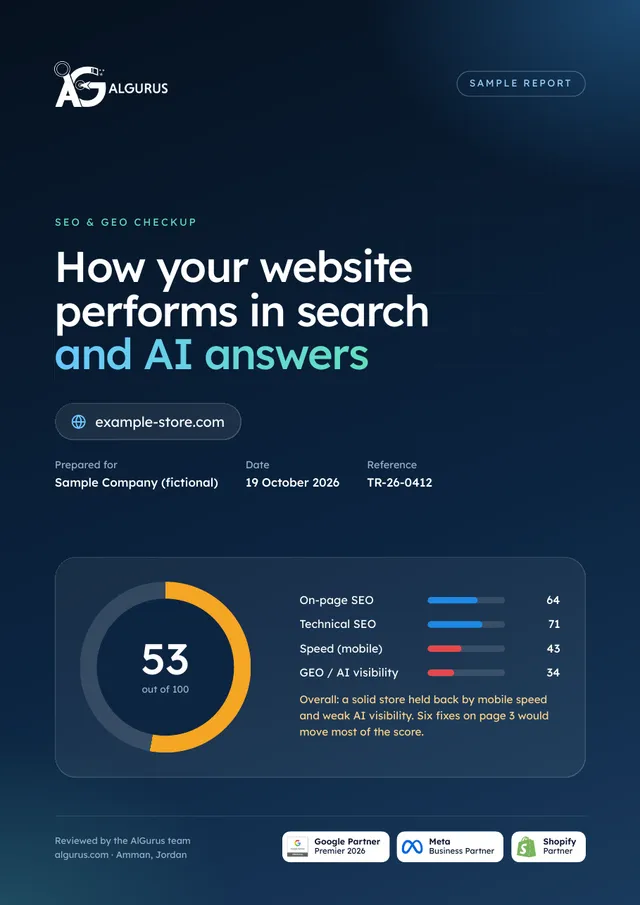
Send us your website. Our team reviews its speed, technical health and how it shows in Google and AI answers, and the audit arrives in your inbox with a plain-language fix for each issue.
Shopify or WordPress: what each platform does best, and how to choose the right foundation for your website in Jordan.
7 min read
Ten common digital marketing mistakes, from no strategy to no tracking, and the best practice that fixes each one.
7 min read
The four paid-media shifts shaping Jordan in 2026: AI-run Meta campaigns, TikTok as search and shop, automated Google bidding, and Snapchat AR.
9 min readLeave your details. We reply on WhatsApp or by phone between 7 AM and 10 PM Amman time, with a first plan within one working day.
The team will contact you between 7 AM and 10 PM Amman time. Want to talk now? Send it on WhatsApp in one tap.
Reference:
It is a web application built to manage your team's work exactly the way you operate: your stages, job types, deadlines, assignment rules, notifications and reports. Unlike a generic task app, it is designed around one business's workflow, and it can include a client view so customers can follow their jobs.
For many teams you should, and we will say so. A custom tool makes sense when you need enforced SLAs, a branded client view, WhatsApp updates, full Arabic support, deep connections to your own systems, or when per-user licence costs have grown large. We often start by reviewing how far your current tool can be pushed.
Yes. Requests arriving through website forms and email can become tasks automatically, and with the WhatsApp Business Platform incoming messages can create or update tasks too. Details such as customer, location and job type are filled in where possible so coordinators only confirm.
Yes. We build a client view as a secure link or a portal login, branded as your company, showing the job's stage, assigned person, next step and any files or approvals. You decide exactly what is shared; internal notes stay internal.
Yes. The tool is built mobile-first for people who work away from a desk, with large buttons, checklists, photo capture, signatures and location where useful. It runs in the phone's browser and can be installed to the home screen.
Each job type, and optionally each client, has its own response and completion targets. Clocks follow your working hours, weekends and public holidays, can pause for reasons you define such as waiting for the customer, and trigger reminders and escalations at thresholds you choose.
It depends on the number of job types and roles, the complexity of rules and SLAs, whether there is a client view, and which integrations are needed. A focused tool for one team is a modest project; a multi-team tool with a client portal is larger. We fix scope and price after modelling your workflow.
Yes. Open tasks, clients, attachments and history can usually be exported from generic task apps or spreadsheets and imported into the new tool, so your team starts with its current work already in place.
You do. The source code, database and hosting are registered to your business, with documentation for future developers. There are no per-user licence fees, only hosting and an optional care plan.










Book a strategy call. Walk us through one real job from request to done, including the chats and spreadsheets. We will tell you honestly whether your current app can do it, and what a custom tool would change.