






















Meta Ad Placement Changes in 2026: What Changed and What You Still Control
Manual placement checkboxes are gone from most campaigns. Here is what replaced them, with screenshots from a live account, and how we set placements today.
- Published
- Reading time
- 6 min

7placements you can bid on with value rules
In 2026 Meta removed manual placement selection from Sales, Leads, Engagement and App promotion campaigns, so every ad set now runs on Advantage+ placements. Awareness and Traffic keep manual placements for now. To steer delivery you use placement value rules (bid a placement up or down), a short account-level exclusion list, and the right creative for each placement.
- Manual placements are gone from Sales, Leads, Engagement and App promotion; Awareness and Traffic keep them for now.
- Placement value rules raise or lower bids for 7 placements and are saved as reusable rule sets.
- Account-level exclusions still block Audience Network, Marketplace and the right column.
- Check Allow limited spend to excluded placements: it can send about 5% per excluded placement.
In this guide10
For years, picking placements was one of the first things a media buyer did in a new ad set: keep the Facebook and Instagram feeds, drop Audience Network, maybe test Reels. In 2026 Meta took most of that choice away. In Sales, Leads, Engagement and App promotion campaigns you can no longer tick and untick placements at the ad set level. Meta now decides where each ad runs, and gives you new, softer tools to steer it.
This guide explains what changed, what you can still control, and how our team sets up placements today in the Meta Ads accounts we run as a Meta Business Partner for brands in Jordan and the Gulf. The screenshots come from a live account we manage.
What Meta Changed in Placements
Manual placement selection is gone from most campaign objectives. For campaigns with the Sales, Leads, Engagement or App promotion objective, the ad set no longer shows the list of placement checkboxes. Every ad set runs on Advantage+ placements, and Meta's delivery system spreads the budget across Facebook, Instagram, Messenger, Threads and Audience Network wherever it predicts the best result.
Awareness and Traffic still have manual placements, for now. These two objectives keep the old placement list. Industry coverage expects them to follow the same path eventually, but Meta has not given a date, so do not build your account structure around them staying manual.
Meta's reasoning is performance. Meta says that wider placement sets let its system find cheaper results, and its own announcements quote around 10% lower average cost per result for Advantage+ placements compared with manual placements. Meta has not published the test details behind that number, so treat it as Meta's claim, not a guarantee for your account.
The change rolled out gradually through 2026, so two ad accounts can look different for a few weeks. If you still see the old checkboxes in a Sales campaign, expect them to disappear.
- 4objectives without manual placements: Sales, Leads, Engagement, App promotion
- 2objectives that keep them for now: Awareness and Traffic
- 7placements you can bid up or down with value rules
What You Can Still Control
Placements did not become a black box. Control moved to four places, and each one does a different job.
1. Placement value rules (bid up or down)
This is the main replacement for the old checkboxes. Inside the ad set there is now a Placement value rules section that tells Meta how much a placement is worth to your business. Instead of excluding a placement, you raise or lower the bid for results that come from it, and the system shifts delivery accordingly.
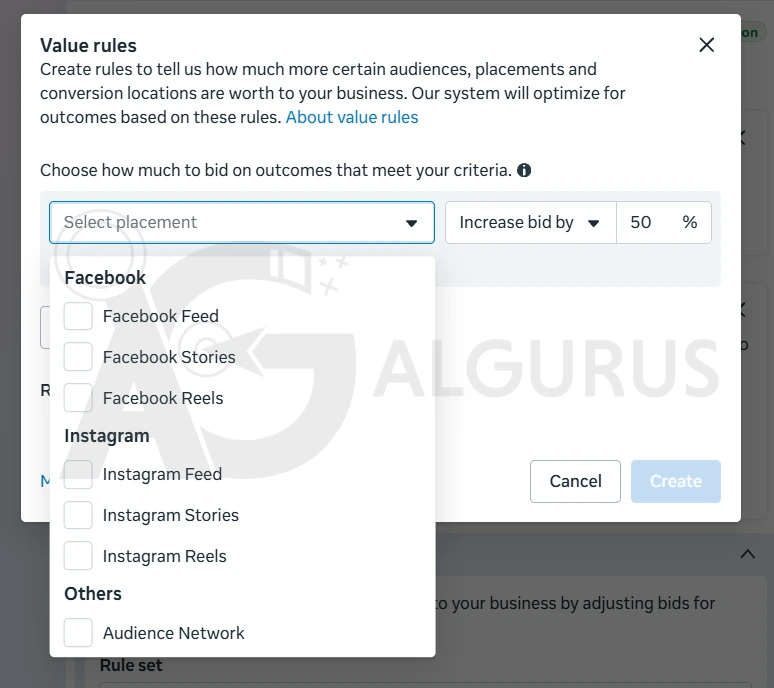
As the screenshot shows, the list is short. You can set rules for seven placements: Facebook Feed, Facebook Stories, Facebook Reels, Instagram Feed, Instagram Stories, Instagram Reels and Audience Network. Placements such as Marketplace, Messenger, Threads, Explore and in-stream video are not in the list, so you cannot bid them up or down.
Rules are saved as rule sets with a name, and one rule set can be reused across several ad sets. In the example below, a rule set called "Feed All 100%" raises the bid by 100% for results from the Facebook and Instagram feeds, and it is already applied to two active ad sets. You can also add other criteria to a rule, such as audiences or conversion locations, and manage every rule set from Advertising settings.
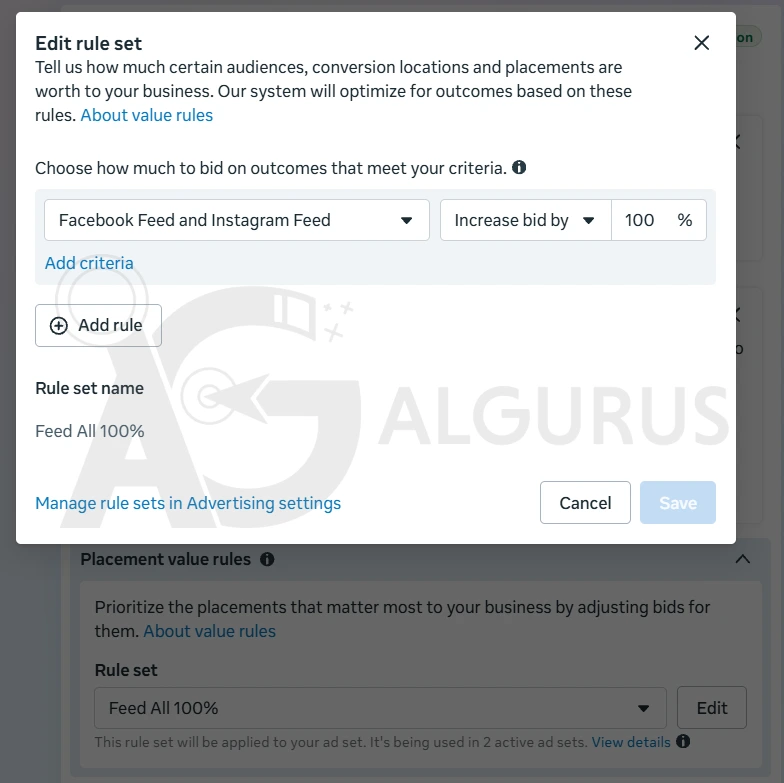
Two things to remember. First, a value rule is a signal, not a wall: even a strong decrease (Meta allows cutting the bid by up to 90%) makes a placement rarely win, but it can still deliver there. Second, a raise makes those results more expensive on purpose, so only raise a placement when results from it are really worth more to you, for example because feed buyers return or spend more.
2. Account-level placement exclusions
For placements you truly never want, Meta keeps a short exclusion list at the ad account level, under Advertising settings. It covers Audience Network (including rewarded video), Facebook Marketplace and the Facebook right column, and you can set it per objective. Changes can take up to 48 hours to reach running campaigns. The list cannot block Reels or Stories, and it does not apply to special ad categories such as housing, employment, credit, or social issues and politics.
3. The "limited spend" setting on exclusions
Where you can still exclude placements, check one setting carefully: Allow limited spend to excluded placements. When it is on, Meta can spend a small part of the budget, around 5% per excluded placement, on the placements you excluded if it expects that to help performance. It is turned on by default in the accounts where it has rolled out. If an exclusion must be absolute, for example for brand safety, uncheck it.
4. Creative and brand safety controls
You still decide what people see in each placement. Media customization lets you upload separate images and videos per aspect ratio (1:1 or 4:5 for feeds, 9:16 for Stories and Reels) and change text and links per placement. Brand safety tools also keep working: the inventory filter and publisher block lists stop delivery on content or apps you do not want next to your brand.
Placements did not disappear. Control moved from checkboxes to bids, and from the ad set to the account.
How We Set Up Placements Now
This is the order we follow when we build or audit a Sales or Leads campaign after the change:
- Clean the account-level list firstExclude only what never works for the brand, usually Audience Network for most ecommerce stores, and check the setting again after 48 hours.
- Decide on limited spendTurn off Allow limited spend to excluded placements where an exclusion must be absolute.
- Give every placement the right creativeUpload 4:5 and 9:16 versions so Meta never has to crop a feed image into a Reel.
- Let it run before adding rulesGive the campaign enough conversions to read the placement breakdown before you bid anything up or down.
- Use value rules with real dataRaise a placement only when its customers are worth more; lower one when its results are weak. Reuse one named rule set across similar ad sets.
- Review the breakdown every weekCheck cost per result and quality by placement in the Breakdown menu, and adjust the rule set, not the structure.
Common Mistakes After the Change
Rebuilding campaigns as Traffic to keep manual placements
Switching a sales campaign to the Traffic objective just to keep the checkboxes trades away conversion optimization. You get cheaper clicks and fewer buyers.
Expecting a value rule to block a placement
A 90% decrease makes a placement rarely win, but it is not an exclusion. Use the account-level list for placements that must never run.
Raising every placement
A rule that raises all placements by the same amount just raises your costs. Rules only help when they create a difference between placements.
Forgetting the creative
If you only upload square images, Stories and Reels get cropped or padded versions and perform worse. The fix is creative, not a placement setting.
Why This Fits Meta's Bigger Direction
The placement change follows the same logic as Meta Andromeda: give the system broad room to deliver, and steer it with creative and conversion data rather than manual limits. Accounts that already consolidated campaigns and fed Meta clean Pixel and Conversions API data felt this change least. For the full picture of how Meta ads work this year, read our ultimate guide to Meta ads in 2026, and see how the same automation reaches the click itself in our post on Meta product browsing.
If your results moved after the change and you are not sure why, a placement breakdown review is usually the fastest way to find out. Our paid ads audit covers it, together with creative and tracking.
Mohammad Khalil Founder of AlGurus
13+ years in digital marketing, $28M+ in managed ad spend and 120+ brands across Jordan and the Gulf. He leads AlGurus, a Google Premier Partner (top 3% worldwide), Meta Business Partner and Shopify Partner, from Amman.
Frequently asked questions
Can I still choose placements manually on Meta in 2026?
Only in Awareness and Traffic campaigns. Sales, Leads, Engagement and App promotion campaigns run on Advantage+ placements, and the ad set no longer shows the placement checkboxes.
What are Meta placement value rules?
They let you raise or lower your bid for results that come from a specific placement, such as Facebook Feed or Instagram Reels. Rules are saved as named rule sets that you can reuse across ad sets and manage in Advertising settings.
Which placements can I set value rules for?
Seven: Facebook Feed, Facebook Stories, Facebook Reels, Instagram Feed, Instagram Stories, Instagram Reels and Audience Network. Placements like Marketplace, Messenger, Threads and in-stream video are not in the list.
Does lowering the bid with a value rule block a placement?
No. Meta lets you cut the bid by up to 90%, which makes the placement rarely win, but ads can still run there. To block a placement completely, use the account-level exclusion list where it is available.
Which placements can I still exclude?
At the ad account level, under Advertising settings: Audience Network (including rewarded video), Facebook Marketplace and the Facebook right column, set per objective. Changes can take up to 48 hours to apply.
What does Allow limited spend to excluded placements do?
When it is on, Meta can spend a small share of the budget, around 5% per excluded placement, on placements you excluded if it expects better results. It is on by default where it has rolled out; uncheck it to keep an exclusion absolute.

